Knowledge Graph
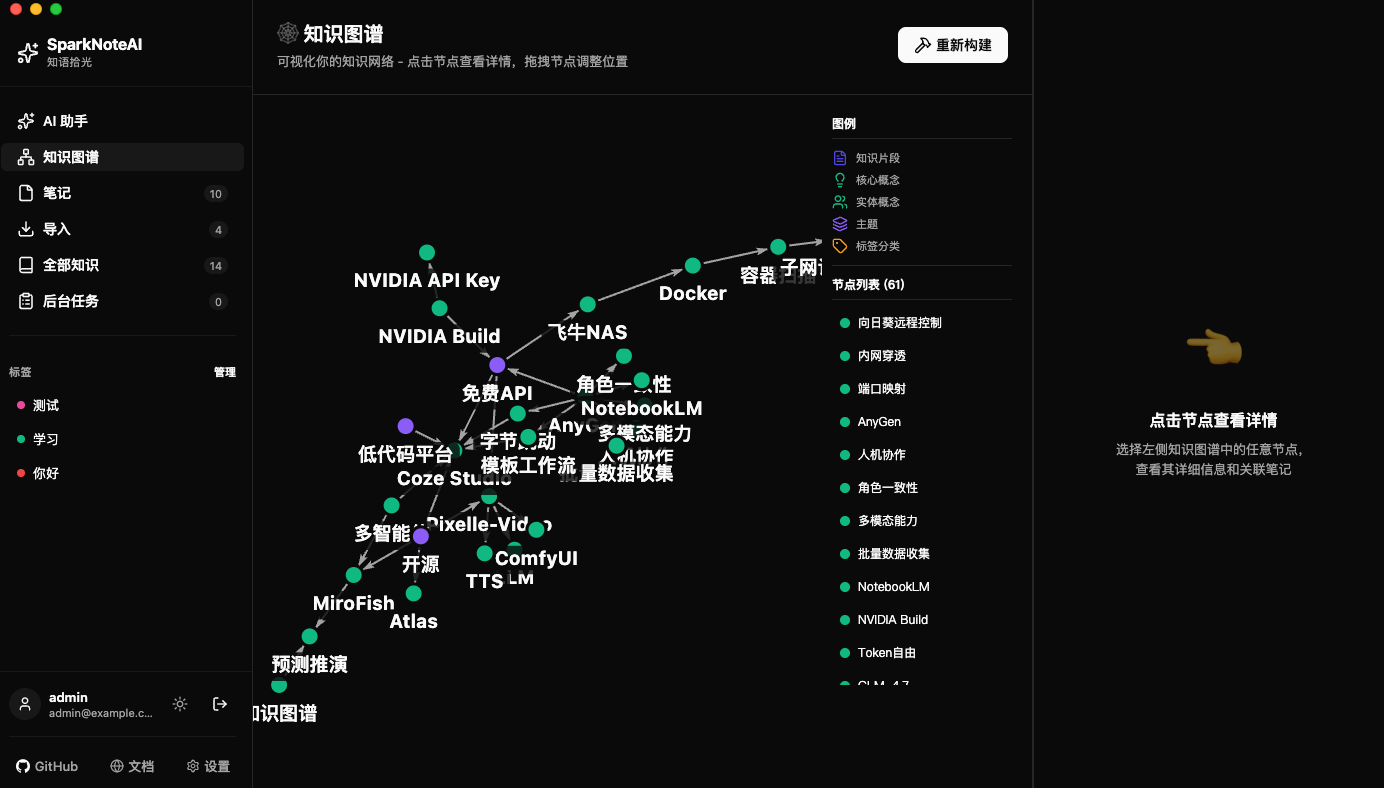
The knowledge graph is a highlight feature of SparkNoteAI. It uses LLM-powered intelligent extraction of concepts and relationships, stored in Neo4j graph database with visual display.
Core Capabilities
LLM-Powered Extraction
- Calls the configured LLM model (OpenAI / Anthropic / Azure / Alibaba Cloud) to automatically analyze note content
- Extracts key concepts and relationships between concepts
- Concept normalization: merges similar concepts to improve reusability
- Supports both full rebuild and incremental update modes
Graph Storage
- Uses Neo4j graph database to store nodes and edges
GraphNodemodel stores concept informationGraphEdgemodel stores relationships between concepts- Nodes can be linked to their corresponding notes
Visual Display
- 2D force-directed graph visualization (react-force-graph)
- Nodes rendered with lucide icons
- Supports node dragging and zooming
- Real-time polling displays graph build progress
Scene Configuration
Which LLM model the knowledge graph uses is managed through FeatureSetting and can be modified in the settings page. Supports:
- Selecting different LLM providers
- Configuring model parameters
- Build status management: maintains LLM configuration state during rebuilds and marks build-in-progress
Usage Flow
- Configure LLM: Set up the LLM for knowledge graph in the settings page
- Build Graph: Trigger the knowledge graph build task
- View Status: Check build progress via status polling
- Explore Graph: Drag and explore concept relationships in the force-directed graph
API Overview
For detailed API documentation, see API Reference - Knowledge Graph.